Your menu belongs on your website, and it should keep itself up to date
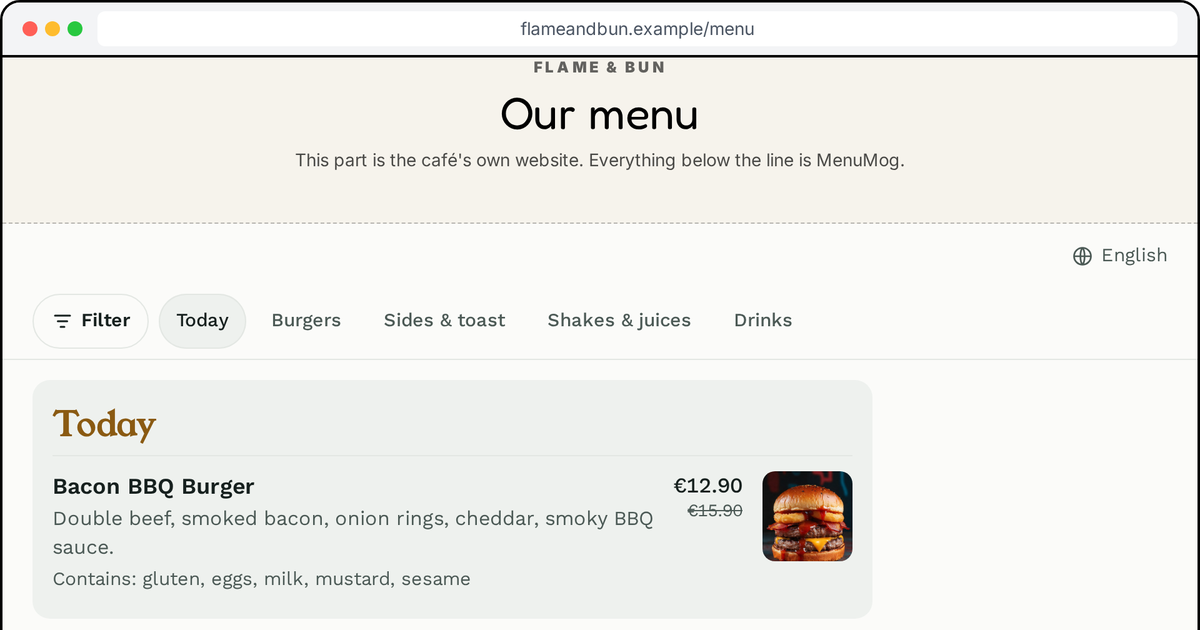
I make MenuMog. This post is about the menu on your own website: why the usual ways of putting it there go wrong, what a menu on a website should do today, and the two lines of code that now put a MenuMog menu on any site.
How menus usually end up on a website
Look at ten café websites and you will find three kinds of menu.
A PDF. Someone exported the printed menu and linked it. On a phone it opens as a tiny page you pinch and drag around, half the time it downloads instead of opening, and it is as old as the day it was exported. Change a price and the PDF is wrong until someone remembers to make a new one.
A photo of the menu. A picture of the chalkboard or the printed card. It cannot be searched, it cannot be read aloud by a screen reader, it cannot be translated, and a search engine sees a picture, not dishes.
A page someone typed. The best of the three, until the menu changes. Now there are two menus to keep in step, the real one and the website's, and the website's always loses. Most of these pages are a season behind.
All three have the same flaw: the website's menu is a copy, and copies drift.
What a website menu should do
I think the bar is simple, and none of it is exotic:
- Be the same menu as everywhere else. One menu, typed once, shown on the website, behind the QR code on the tables and on the TV over the counter. Change a price once and it changes everywhere.
- Read well on a phone. Most people who look at a café's website are on a phone, often standing outside the door.
- Answer the allergy question. Every dish says what it contains, in words, and a guest can hide what they cannot eat.
- Speak the guest's language. In Estonia that means at least Estonian, English, Russian and Finnish.
- Be readable by search engines. Dishes and prices as text, on your own domain.
- Stay out of the way. It must not slow your homepage down, break your theme or follow your visitors around the internet.
Two lines
Every MenuMog menu now has its own code, in the editor under On your website:
<script src="https://www.menumog.com/embed.js" async></script>
<menumog-menu menu="your-menu-code">
  <a href="https://www.menumog.com/view/your-menu-code">Our menu</a>
</menumog-menu>
You paste it once where the menu should be. From then on the website shows whatever the menu is in MenuMog, the same second you change it. There is no plugin to install and nothing to update, ever.
What <menumog-menu> is
It is a web component: your own HTML tag, taught to the browser by a short script. Web components are part of the web platform itself, not of any framework, and every current browser supports them. That is why the same two lines work in WordPress, Squarespace, Webflow, Shopify or a page your nephew wrote by hand.
What the tag does, in order:
- Waits. Nothing loads until a visitor scrolls near the menu. The script is about 3 KB; your homepage loads exactly as it did before.
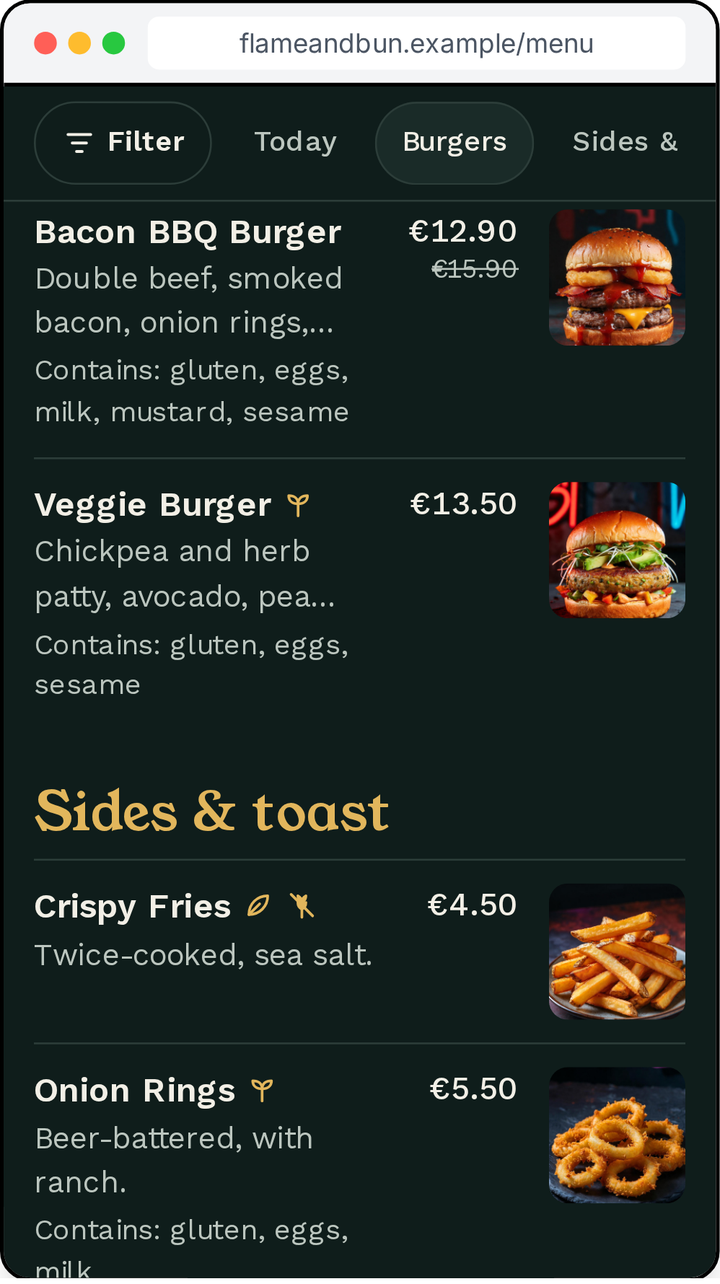
- Shows the menu in a sealed frame. Your theme's styles cannot bend the menu, and the menu cannot touch your page. Your colours come along anyway: MenuMog reads your logo and colours off your website when you set the menu up, and you can pick light or dark to sit in your page.
- Grows to its full height. No box with its own scrollbar inside your page. The page scrolls as it always does, the menu's section bar follows the reader down, and when someone taps a dish, its details open where they are looking, not at the far end of the menu.
- Tells search engines what is on it. The script puts your dishes, prices and diet marks into your page as schema.org menu data, the format search engines read for restaurant menus, on your domain.
- Leaves your visitors alone. No analytics and no tracking cookies. Your cookie banner does not get longer.
The link inside the tag matters too. It is what a visitor sees before the menu loads, what a search engine or a browser without JavaScript sees, and what is left if MenuMog is ever unreachable. Nobody gets an empty space.
Why a frame, and not the menu poured into your page
A fair question from anyone technical. Pouring the menu straight into your page would mean your theme's fonts, line heights and stray CSS rules fighting the menu's, on every site differently. It would also mean a second copy of the menu's code to keep in step with the one behind the QR code.
The frame is the same menu your guests already get when they scan the table, with its allergen filter, its languages and its dish photos. The web component is what turns that frame into a well-behaved part of your page: the right height, scrolling with the page, loading late, carrying your search data.
Adding it to WordPress
- In MenuMog, open your menu, then On your website. Pick light or dark, show or hide your logo, and press Copy the code.
- In WordPress, edit the page where the menu goes.
- Add a Custom HTML block (in Elementor: the HTML widget; in Divi: a Code module) and paste.
- Update the page. Done, for good.
If your theme has a header that stays at the top while scrolling, add offset="80" to the tag, with your header's height in pixels, so the menu's section bar sits just under it.
Squarespace (a Code block), Webflow (an Embed element) and Shopify (a Custom Liquid section) work the same way. Some site builders run scripts only on paid plans, and a few never do. On those, use the link: it opens the same menu on its own page.
One menu, everywhere
This is the point of MenuMog. You type the menu once, and it is set for every place a guest meets it: the QR code on the table, the TV over the counter, the week's lunch picture for Facebook and Instagram, and now your own website. Each one is laid out for where it is, and all of them are the same menu.
You can try the website menu live, scroll it and tap the dishes, on the website menu page.
Share this article
Ready to create your digital menu?
Join restaurants and cafes using MenuMog for QR menus, ordering, and more.
Get started free